
Palstat CAQ - system structure

The system can be operated in various configurations with different scalability according to the requirements and use of each customer.
The software is developed as desktop software for the Windows environment using C#, with CAQdesktop as the main client x68 application. This is typically run from network storage by clients who only have a shortcut to the main system "hub" ./APL/Launcher.exe on their Windows desktop.
CAQservice (sys. service)
Description: Windows x64, digitally signed, system service.
Usage: Index maintenance, data collection scheduler startup, license and activation management, email or SMS notification sending, secure configuration distribution to clients.
Advantage: It can run under the required permissions within the domain or system and thus access both local and remote network resources.
Disadvantage: An additional TCP port is opened and traffic encryption is weaker. Installation, operation, and monitoring of an additional system service is required.
Communication: HTTP/S, SMTP, MSSQL, Listener 8001.
CAQservice (IIS site/app)
Description: Windows x64, digitally signed, IIS as Site or App.
Usage: Index maintenance, running scheduler for data collection, license and activation management, sending notifications via email or SMS, secure distribution of configurations to clients
Advantage: Option to encrypt traffic and deploy certificates on IIS. Easier upgrades and administration common to CAQapi and CAQweb.
Disadvantage: Problematic when the service uses a driver that processes data from files. The IIS process usually does not have sufficient permissions to access files.
Communication: HTTP/S, SMTP, MSSQL
CAQdesktop
Description: Windows x86, digitally signed
Usage: Main client part for clients and control of the entire system.
Communication: HTTP/S, SMB, MSSQL, CAQservice 8001 (Only if running as sys.service)
CAQweb
Description: Windows x64, digitally signed, IIS as Site or App.
Use: Use of selected Palstat system functions via a web interface.
Communication: HTTP/S, MSSQL
CAQapi
Description: Windows x64, digitally signed, IIS as Site or App.
Use: Data exchange for external systems, required when using CAQmobile
Communication: HTTP/S, MSSQL
CAQmobile
Description: Android/Apple
Use: Limited access to selected Palstat system modules.
Communication: HTTP/S on CAQapi
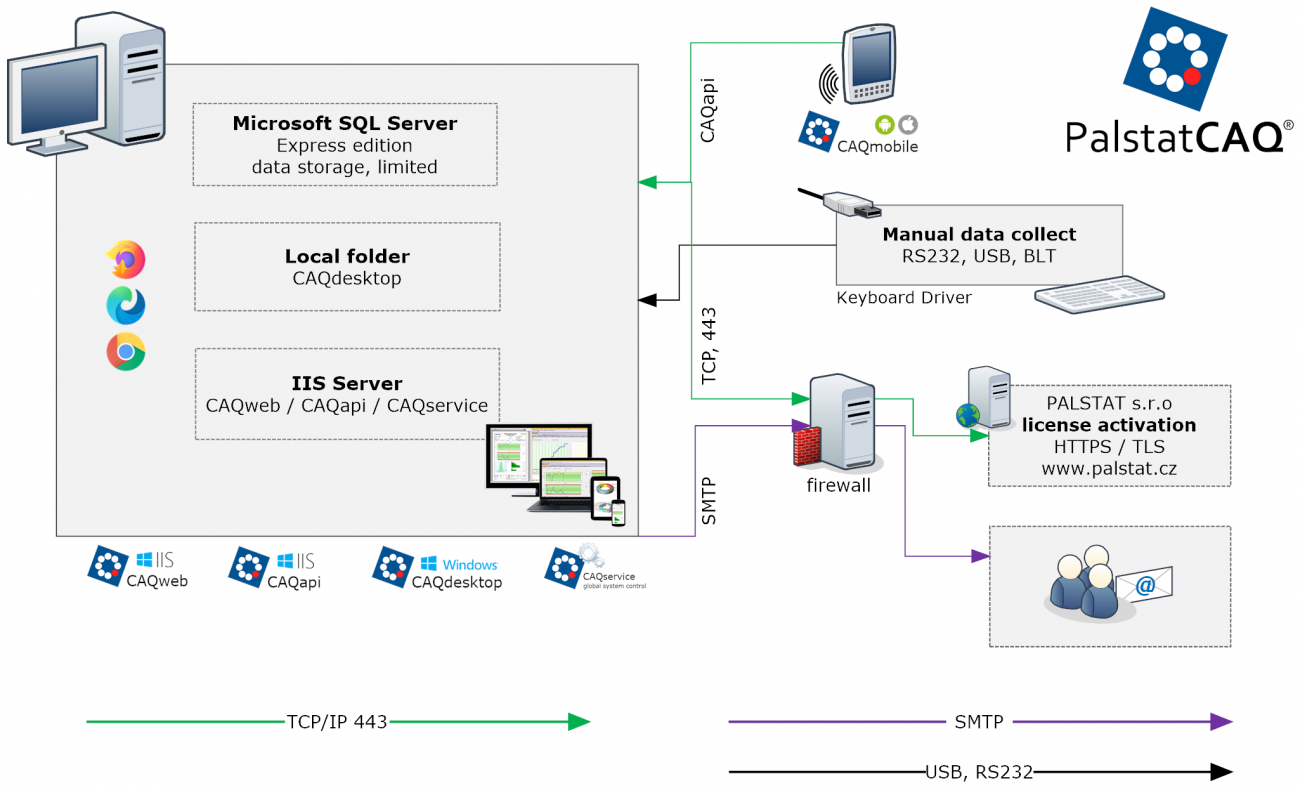
OneSite - standard compact installation
Most customers choose this option, which combines all components into a single virtual machine. This solution offers the advantages of easy management and uniform scalability according to VM settings. However, it is not always possible due to the need to purchase an MSSQL Server license. In such cases, an existing MSSQL server that the company uses for other purposes can be utilized.
+ Easy installation, operation, and maintenance.
+ Suitable for most installations.
+ Easier operation of data collection from local RS232/USB devices.
+ Easier connection to external ERPs.
+ Everything managed by your own IT department without the influence of the parent company or external IT.
- Additional MSSQL Server (for the full version) / MS Server license required.
- Increased hardware requirements.
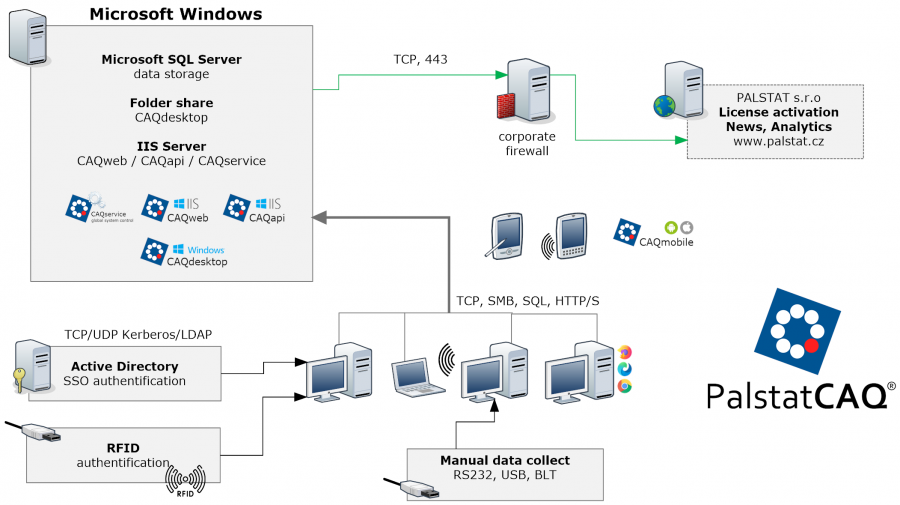
OneSite - comprehensive installation
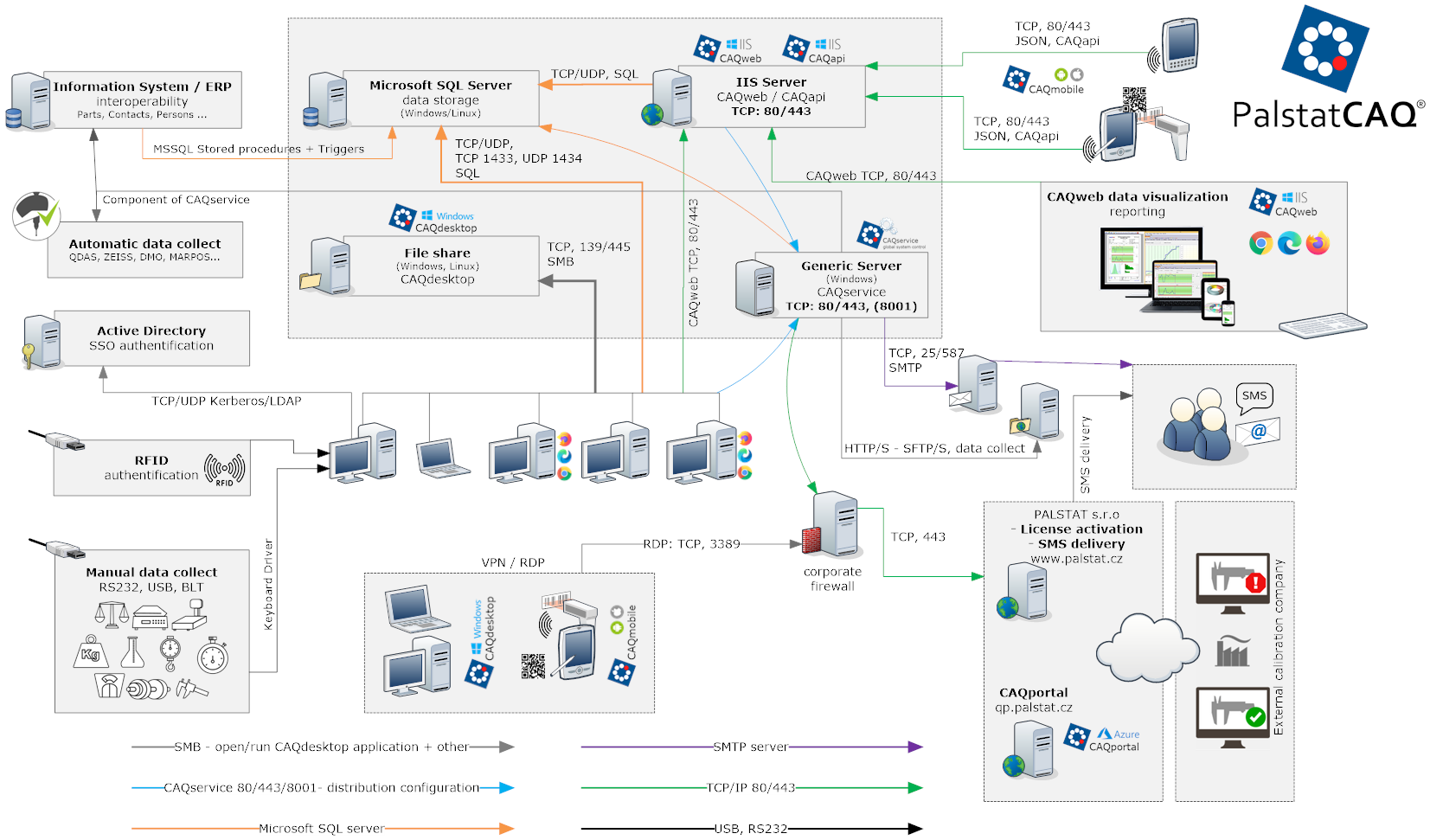
The following visualizations show the wide range of possibilities offered by the entire system, which is only used in large corporations where all its parts are utilized.
In the example, the individual components (MSSQL, IIS, SMB share) are physically separated. This deployment allows for the independent scalability of each machine according to current requirements. It is always possible to combine individual components according to requirements.
This demonstration is not standard and primarily visualizes the possibilities of connecting to external components (ERP, RFID, USB, RS232, AD SSO, etc.).
+ Load balancing.
+ Use of existing MSSQL installation in the company.
+ Use of existing IIS and Share server.
+ Easier operation of data collection from local RS232/USB devices.
+ Easier connection of external ERPs.
+ Everything managed by our own IT department without influence from the parent company or external IT.
- More complicated deployment and maintenance.
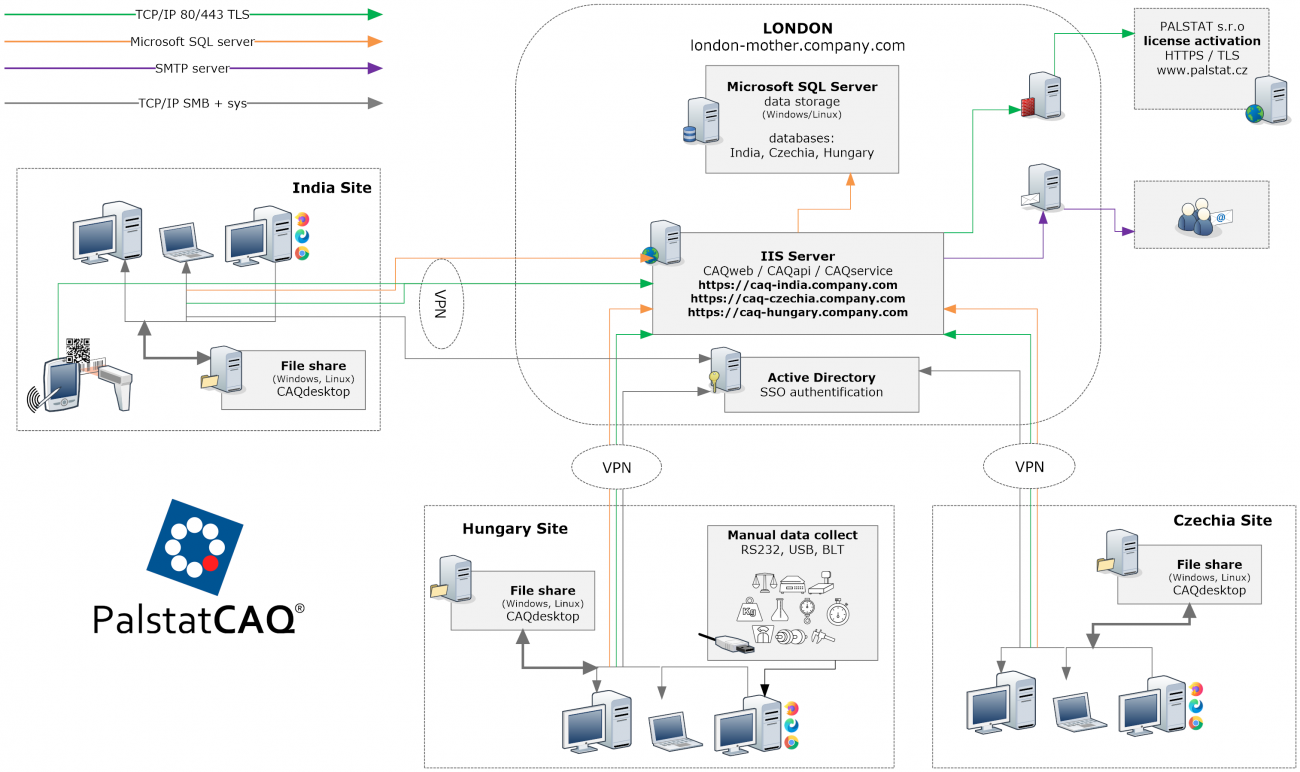
MultiSite - VPN
A solution for when it is necessary to store the database on a remote server and combine data from multiple locations/installations. This solution is suitable when a fast VPN connection is guaranteed. It is recommended to install CAQdesktop applications on the local network of each branch to optimize application launch speed. This solution places increased demands on system maintenance and application updates at each branch. For more information, continue here.
+ Easier management of access control at the remote access level.
+ Key data from multiple locations in one place.
+ Easier operation of data collection from local RS232/USB devices.
- More difficult system management.
- Possible requirement for additional VPN licensing.
- Increased hardware requirements to serve all clients.
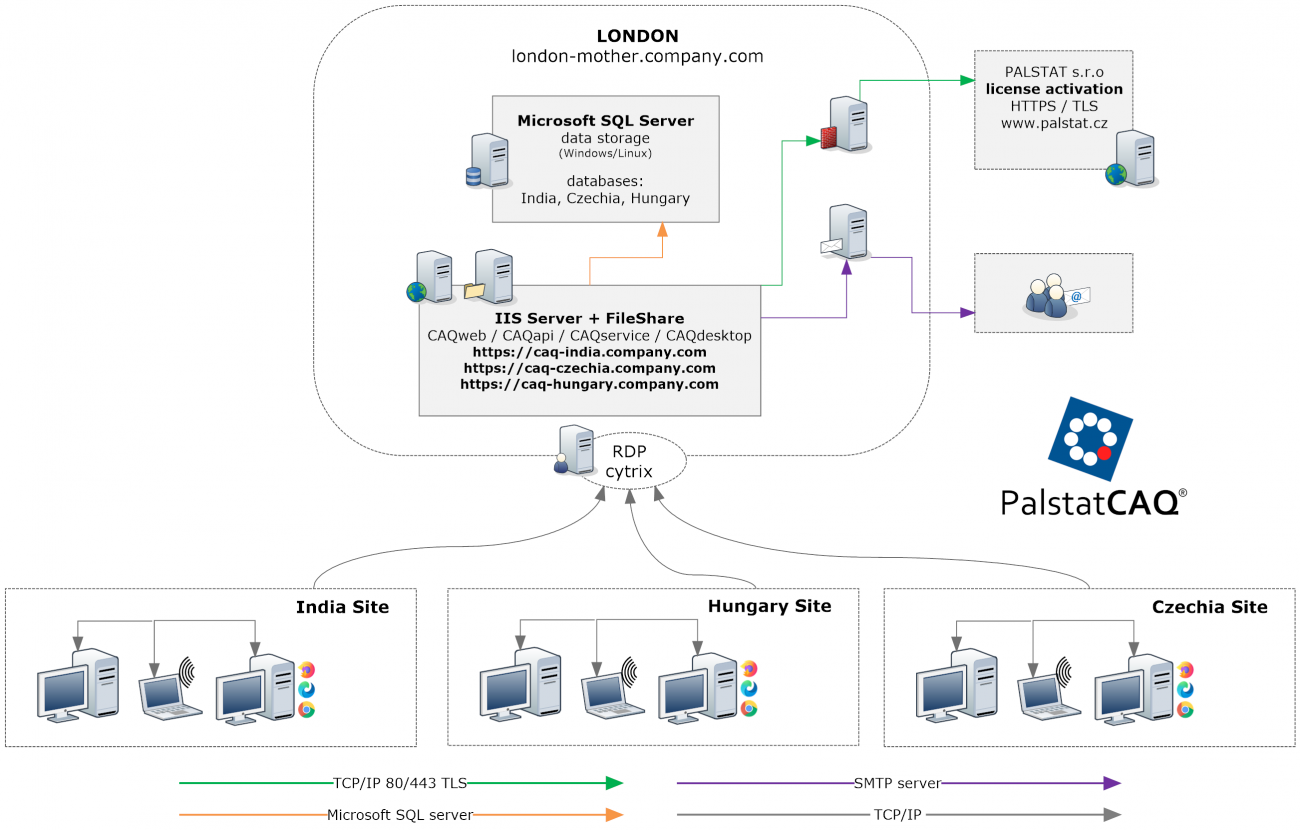
MultiSite - RDP/Cytrix
Solution for strict requirements to keep all data on the parent server.
+ Easier system administration.
+ Easier management of access control at the remote access level.
+ All data from multiple locations in one place.
- Requirement for additional remote access licensing.
- Increased hardware requirements to serve all clients.
- Problematic connection of data collection from local devices and USB/RS232 redirection via remote access.
WorkStation
Solution for small installations with a single license.
+ Very simple, all components on one station.
+ For small use on a single PC station.
+ Also allows data collection and use of CAQmobile.
- When used on a workstation, separate MSSQL backup must be addressed.
- Use on only one station.
 |
© Copyright 1992 - 2026 PALSTAT s.r.o. |
PALSTAT s.r.o. Bucharova 230 543 02 Vrchlabí CZECH REPUBLIC |
tel.: +420 499 422 044 tel.: +420 499 692 016 www.palstat.cz |
» Home Page » Training » References » News |
» Events » Partners » Support » Contact |
» Products » Customer portal » Remote support » Update |
» Terms and Conditions » Gallery » Map » Portal 2 |